Kinema Download

Free local media library & video player

Your films. Set up right, by itself.

Kinema is a free, open-source, Netflix-style library and player for the movies and shows already on your disk or NAS. It finds the posters, remembers where you stopped, and gets the picture and sound right for your screen and speakers, with no server, no account and no settings maze.

Free and open source (MIT) · Windows 11 · Linux · Android TV (early version)

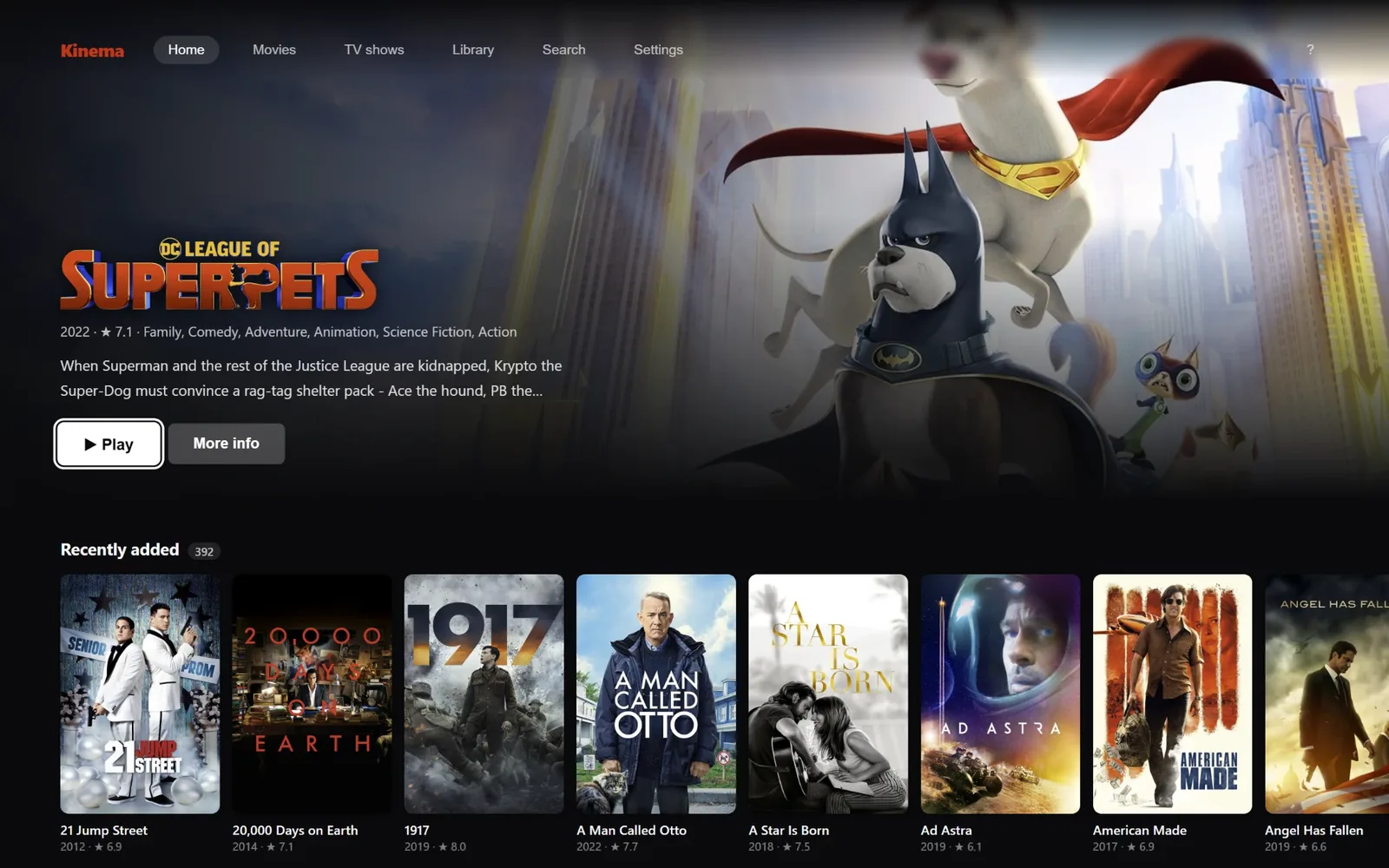
Kinema's home screen: a full-width backdrop for a film in the library, with a Play button, and a rail of recently added film posters beneath it
●No server ●No account ●Mouse, keyboard or remote ●24p, HDR and Atmos set up for you

01 · Why Kinema

The missing middle between VLC, Kodi and Plex.

Most people who keep their own video files end up choosing between three kinds of program, each good at one thing. Kinema is a Kodi and Plex alternative for people who would rather just press play.

Plays anything

VLC & MPC-HC

They just work, which is why so many people never leave them. But you get a file browser with a player in it: no posters, no “continue watching”, no next episode, no Skip intro.

Tuned to perfection

Kodi

No server, plays almost anything and can be tuned to do exactly what you want. It can also be clunky to find your way around, its many settings are a lot for a newcomer, and the best-looking skins are heavy, so they can make it sluggish, most of all on a modest PC or a TV box.

Looks the part

Plex & Jellyfin

They close the gap, but only once a server is running somewhere and somebody keeps it maintained.

The one in between

Kinema

The library and polish of a streaming app, the “press play and it works” of VLC, and no server. One program that looks good out of the box, with nothing to host, skin or maintain, and stays quick on a TV box as well as a big PC.

At a glance
FeatureVLC & MPC-HCKodiPlex & JellyfinKinema
Needs no serverYesYesNo, a server has to runYes
Library with posters, resume and next episodeBasicYesYesYes
Looks like a streaming app out of the boxNoWith a skinYesYes
Plays your files as they are, with no transcodingYesYesUsually, otherwise transcodedYes
Refresh rate, HDR and receiver sound set up for youBy handBy handDepends on the client appYes, from what your equipment reports

A simplified view from the author's own experience. Each of these is a good program that does its job well; Kinema is built to fill the gap between them, not to replace what any of them does best.

02 · It sets itself up

You don't need to know what 24p is.

Getting a film to look and sound right at home depends on things most people have never heard of: whether the screen switches to the film's 24 frames a second or shows it with judder, whether HDR is on, which sound formats the receiver can take untouched, which subtitles should show. Enthusiasts spend hours on this in MPC-HC or Kodi. Everyone else never does, and gets a picture or sound that is a little wrong without ever knowing. Settings are grouped by what you want to do, with a search box at the top.

Kinema asks your equipment what it can do, and sets things up from the answer.

  • 01
    The screen matches the filmIts refresh rate for smooth 24p, and HDR switched on for an HDR film.
  • 02
    Atmos, DTS:X and TrueHD go to a receiver untouchedWhen the receiver takes them.
  • 03
    Subtitles in your languageWhen the sound is in another, and none when it is not.
  • 04
    A film is never matched to the wrong titleWhen Kinema is not sure, it puts the file aside for you to check instead of guessing.

You answer a few plain questions once, on the first run, each with what it gives and what it costs, and each skippable. If you know what all this means, the setup is the part you get to skip, and the details are one key away.

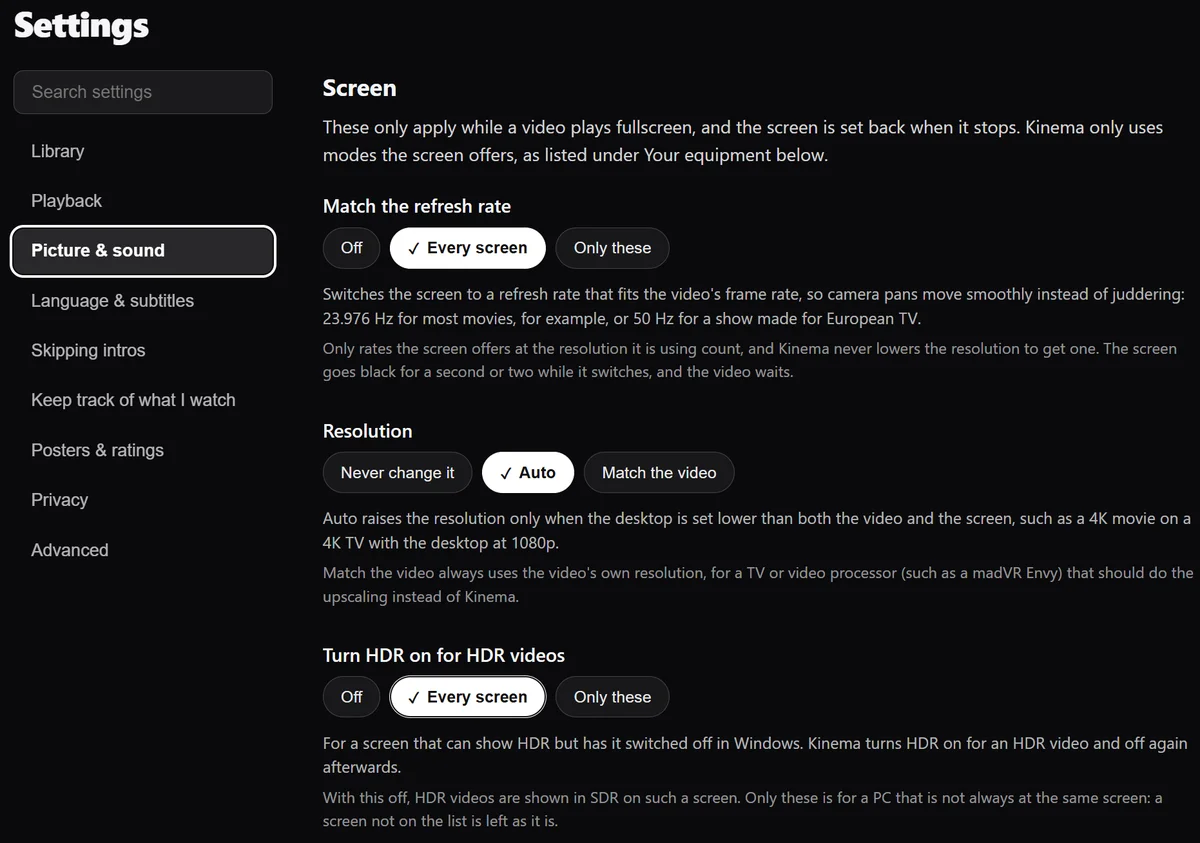
Settings, Picture & sound, Screen: Match the refresh rate, Resolution and Turn HDR on for HDR videos, each a row of plain choices with a short explanation of what it does
There is no quality preset to fiddle with, on purpose: the right choice depends on the film and the screen, and Kinema already knows both.Nothing is invented either: no machine-learning upscaling that makes up detail the master never had, and no frame interpolation that makes up frames.
Playback detailspress i while watching
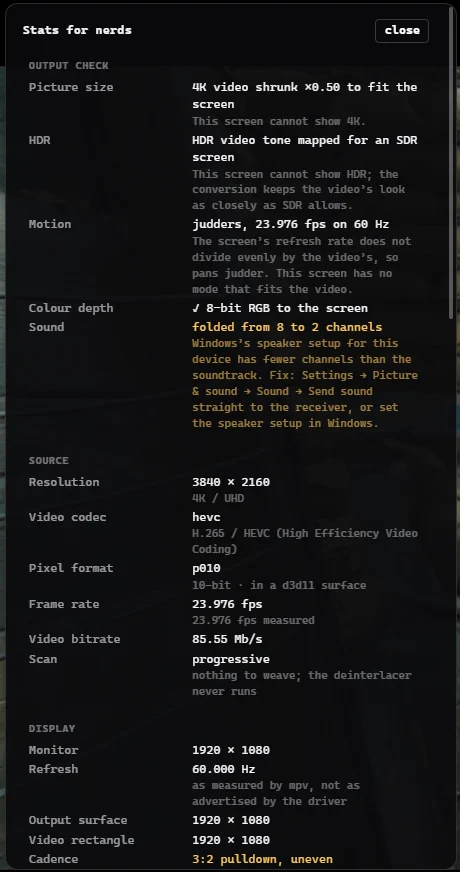
Kinema's playback details panel: output check, source, display and rendering sections listing the real refresh rate, frame cadence, scaler and colour pipeline
The playback details panel reports what is really happening: the display's measured refresh rate, the frame cadence, which scaler ran and why, and the colour pipeline end to end. It reports rather than flatters.

03 · What it looks like

Browse like a streaming app. Know what you're playing.

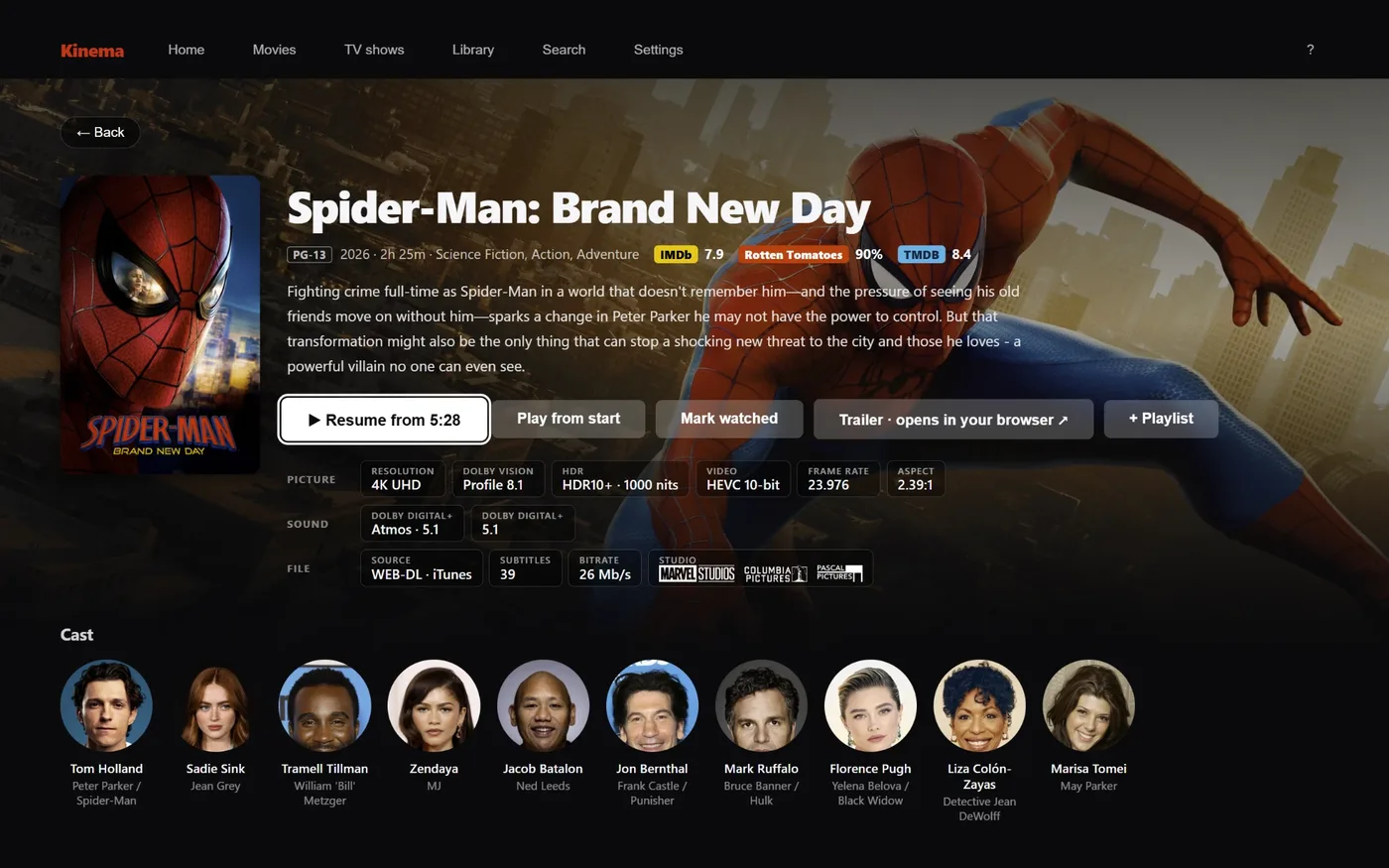
A film's detail page: poster, description, IMDb, Rotten Tomatoes and TMDB scores, badges for resolution, Dolby Vision profile, HDR format, sound format, frame rate and aspect ratio, and a row of cast portraits
Badges that say what the file really holds: resolution, Dolby Vision profile, HDR, the exact sound format, frame rate and an aspect ratio measured from the picture itself, beside scores and cast.
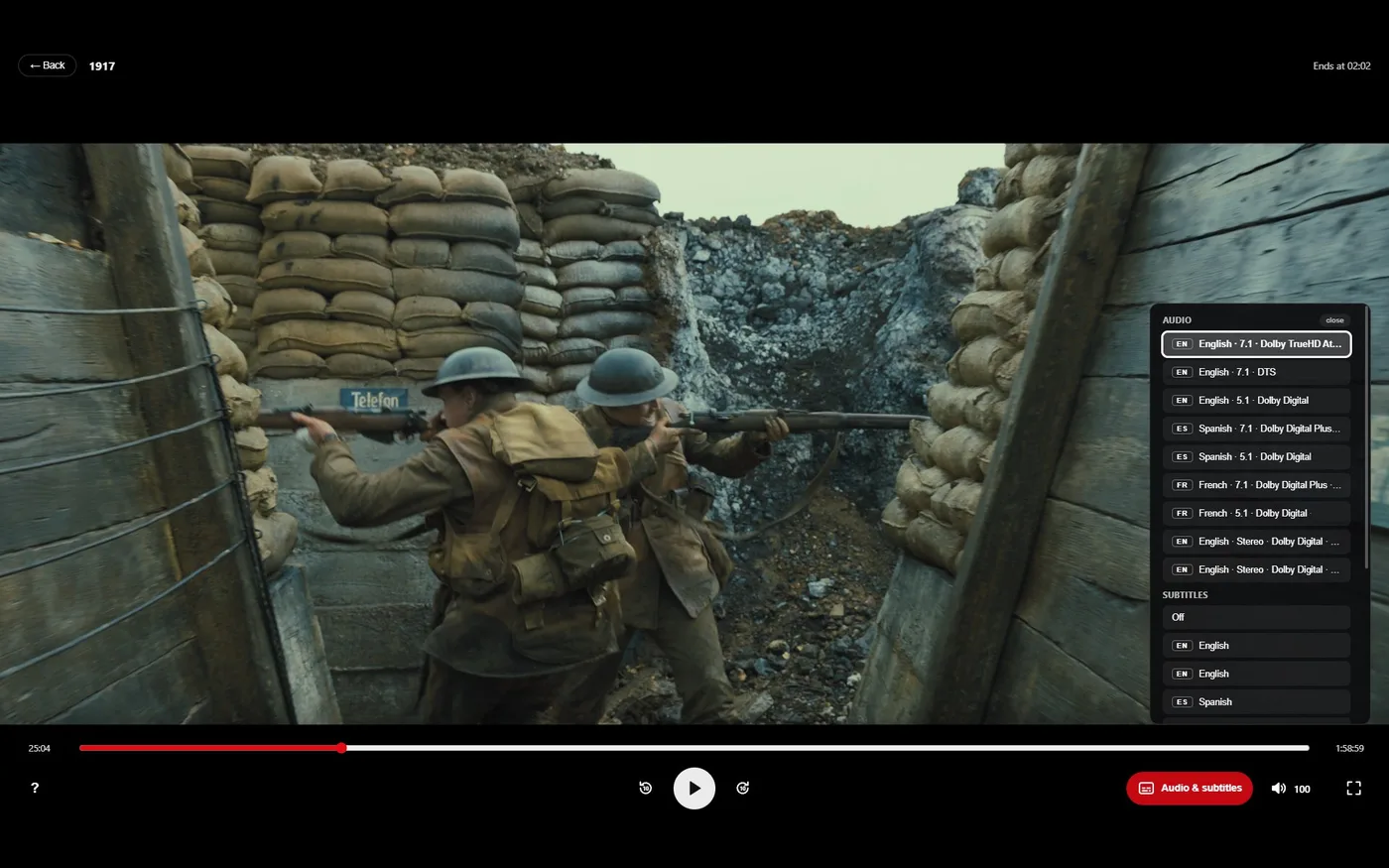
The player: a seek bar, transport buttons, volume and an Audio and subtitles button, with the list of audio tracks open on the right
A player that stays out of the way: seek bar, audio and subtitles, volume, and when the film will end. It works the same with a remote, a keyboard or a mouse.

04 · What it does

Everything a media library should, and nothing to maintain.

01

Finds your movies and shows

Walks the folders you point it at: a local drive, a USB drive or a NAS share. It reads file names, never file contents, so scanning a NAS stays cheap.

02

Refuses to guess

A match it is not confident about goes to a review queue with the reason, rather than silently attaching the wrong movie to your file.

03

Remembers where you were

Per file, and offers the next episode. Posters show what you have watched.

04

Skips intros, recaps and credits

From community databases, chapter markers, or by comparing a season's audio. Where a film has a scene after its credits, Skip takes you straight to it.

05

Subtitles that fit

In your language when the audio is in another, forced subtitles for foreign lines, and online search when a file has none in yours.

06

Plays through mpv

Hardware decoding, HDR converted for screens that cannot show it, the picture-based subtitles of Blu-ray discs, and untouched 4K disc copies (remuxes). On Android it uses Android's own media player, which takes Dolby Vision and receiver sound from the system.

07

Works from the sofa

Browsing, search with an on-screen keyboard, playing, subtitles and resume all work with a D-pad. The TV layout fills the screen with bigger text.

08

Yours, and offline

Posters and descriptions are cached locally. No account, no telemetry, and a weekly safety copy of your watch history and resume points. Settings → Privacy lists every service Kinema can contact, what it sends and what stops it.

09

Tracks what you watch, if you want

Connect SIMKL or Trakt and what you finish is added to your account. Nothing else is sent, and it stays off until you connect it.

05 · Is it for you?

An honest answer, in both directions.

Yes, if you…

…keep your own movies and shows as files on a PC, a laptop plugged into the TV, a Linux box or an Android TV box, and want them to look and sound right without it becoming a project.

  • Never wondered what a refresh rate or a sound format has to do with a film, and should not have to. Kinema sets it up, so the picture and sound are what the film's makers meant, on the equipment you have.
  • Know exactly what they are, have spent evenings in a config file for them, and would rather have them just work. Kinema does what you would have configured, shows its working, and gives the evenings back.

Probably not, if you want…

Better to know before you download.

  • Your library on every screen in the house, or on the road. With no server, a film plays on the device Kinema runs on. Several devices can read the same NAS (a network drive), but each keeps its own library and its own place in a film.
  • Streaming-service apps or an add-on store. Kinema plays the files you own. Keeping that kind of thing working is a job of its own, and Kinema is built to run for years without one.
  • A tuning bench. If you enjoy comparing upscalers and writing shader chains, Kinema takes those decisions away on purpose: no quality presets, no machine-learning upscaling, no frame interpolation.
  • Apple TV, iPhone or iPad. Not planned. A Mac version is possible one day, with no promise attached.
  • Something to pay for. Kinema is free and open source, and will stay that way: no premium tier, no subscription, no “unlock 4K” button. If paying is how you know software is good, we are sorry; there is nobody to hand the money to.

06 · Who makes it

Built with an AI assistant. Checked in the open.

Kinema is built by one person together with Claude, Anthropic's AI coding assistant, which writes the code under the author's direction; the author decides what Kinema is, and what it deliberately is not. A project made that way has to earn trust differently, so the checking is out in the open.

  • Automated tests run on every change, on Windows and Linux (x86-64 and ARM).
  • Scripts run the real app and the real player through scripted sessions, not just the parts in isolation.
  • Every design decision is written down with its reasons in HISTORY, and every trap found along the way in GOTCHAS.
  • It is MIT-licensed and all of it is on GitHub to read.

It is an early project, tested on a small number of setups. Reports from yours, working or not, are what shapes it.

07 · Download

Free. Pick your system.

Every release is on GitHub, with a checksum beside each file so you can check it is the one that was published.

Your system

Windows 11

Installer or ZIP

Installer or ZIP? The installer, if you are unsure. It installs for your account only (no administrator) with a Start menu entry, and Settings → Apps removes it completely; it asks before deleting your library and settings. A newer version installs over it and keeps everything.

The ZIP, if you want everything in one folder (a USB stick, nothing installed): extract it anywhere and run kinema.exe. Deleting the folder removes it.

Windows asks once (“Windows protected your PC”) because Kinema is not code-signed, which is the same box any small independent program gets. Click More info, then Run anyway. This applies to both.

To check a download, run Get-FileHash .\kinema-windows-x64-setup.exe -Algorithm SHA256 in PowerShell and compare it with the matching .sha256 file.

Your system

Linux

.deb · .rpm · folder · x86-64 & ARM

Ubuntu 24.04 or later, Debian 13 and Fedora through the packages; other distributions through the folder. Kinema uses your system's mpv and WebKitGTK, and the package manager installs them.

HDR needs mpv 0.40 or later and a desktop and graphics driver that offer it; the playback details panel says which one is missing.

After downloading: sudo apt install ./kinema-linux-amd64.deb or sudo dnf install ./kinema-linux-x86_64.rpm

These are for x86-64 PCs. ARM computers: .deb · .rpm · .tar.gz

Your system

Android TV

APK · early version

An early version, installed by hand: copy the .apk to the box (a USB stick works) and open it. Android asks once to allow installs from that source.

Tried so far on one TV box and an emulator, so reports from other boxes are especially welcome.

Download the APK

Every file has a .sha256 checksum beside it on the release page, and older versions stay there too.

08 · Questions

Frequently asked questions.

What is Kinema?
Kinema is a free, open-source media library and video player for Windows 11, Linux and Android TV. It scans the folders where you keep your movies and TV shows, on a local drive, a USB drive or a NAS, finds posters and descriptions, remembers where you stopped, and plays everything through mpv (through Android's own media player on Android TV).
Is Kinema really free?
Yes. It is MIT-licensed open source, with no premium tier, no subscription and no ads, and it will stay free and open source.
Do I need a media server like Plex or Jellyfin?
No. Kinema is one program: there is nothing to host or keep updated, and when you close it nothing is left running. The other side of that is that a film plays on the device Kinema runs on; it does not stream to your other devices.
Is Kinema a good Kodi alternative?
If you like what Kodi does for your own files but not the effort of skinning, tuning and learning its settings, yes: Kinema gives you a library that looks good and plays right out of the box. If you rely on Kodi add-ons for streaming services, no. Kinema plays only the files you own.
Does it play 4K HDR, Dolby Vision, Atmos, DTS-HD and TrueHD?
Yes. On a screen that supports HDR it shows HDR, and on one that does not it converts the picture to look as close to SDR as it can. Atmos, DTS:X and TrueHD can be sent untouched to a receiver that takes them. If a Dolby Vision file needs a decoder your setup does not have, Kinema plays the HDR10 base layer and says so, rather than claiming a picture it did not show. A playback details panel (press i) shows what is really happening.
Which systems does it run on?
Windows 11, Linux (Ubuntu 24.04 or later, Debian 13 and Fedora through packages, other distributions through a folder, on x86-64 and ARM) and Android TV, which is an early version installed by hand. macOS is not available yet.
Do I need an account or an internet connection?
No account. Posters and descriptions come from TMDB through a key Kinema carries, and once fetched they are kept on your device, so browsing works offline. SIMKL, Trakt and OpenSubtitles are optional and stay off until you connect them.
Does Kinema collect data about me?
No accounts, no telemetry, no analytics. Kinema asks metadata services about the titles in your library, and asks GitHub once per launch for the latest version number (you can turn that off in Settings → Advanced → Look for new versions). The full list of what it connects to, what it sends and what stops it is on the What leaves your computer page, and in Kinema under Settings → Privacy.
Will it change or move my files?
No. Your files are only read, never renamed, moved or written to. The one exception is an optional export of .nfo files that you have to press yourself.
Windows says “Windows protected your PC”. Is that a problem?
It appears once because Kinema is not code-signed, which needs a paid certificate. It is the same box any small program from an independent developer shows, and it does not mean something was found. Click More info, then Run anyway. Every release publishes a checksum beside each file, so you can check that the one you downloaded is the one that was published.
Was Kinema made with AI?
Yes. It is built by one person together with Claude, Anthropic's AI coding assistant, which writes the code under the author's direction. The checking is out in the open: automated tests on every change, scripted sessions through the real app and player, and every design decision written down with its reasons.